


Programmer Tip - Multiline Editing
Ever wanted to edit multiple lines at once in visual studio? No? Well now you can either way.
Comment Many Lines At Once
Sometimes you are in need of modifying many fields at one, to make them ALL from private to public.
Other times you might want to _leave a comment on many lines_, while having those comments aligned.
And finally, other times, you just want to delete many lines at once.
If this has ever been the case, and you use Visual Studio, then you are in luck, as this popular IDE also counts with a way to manipulate as many lines as you want at once:
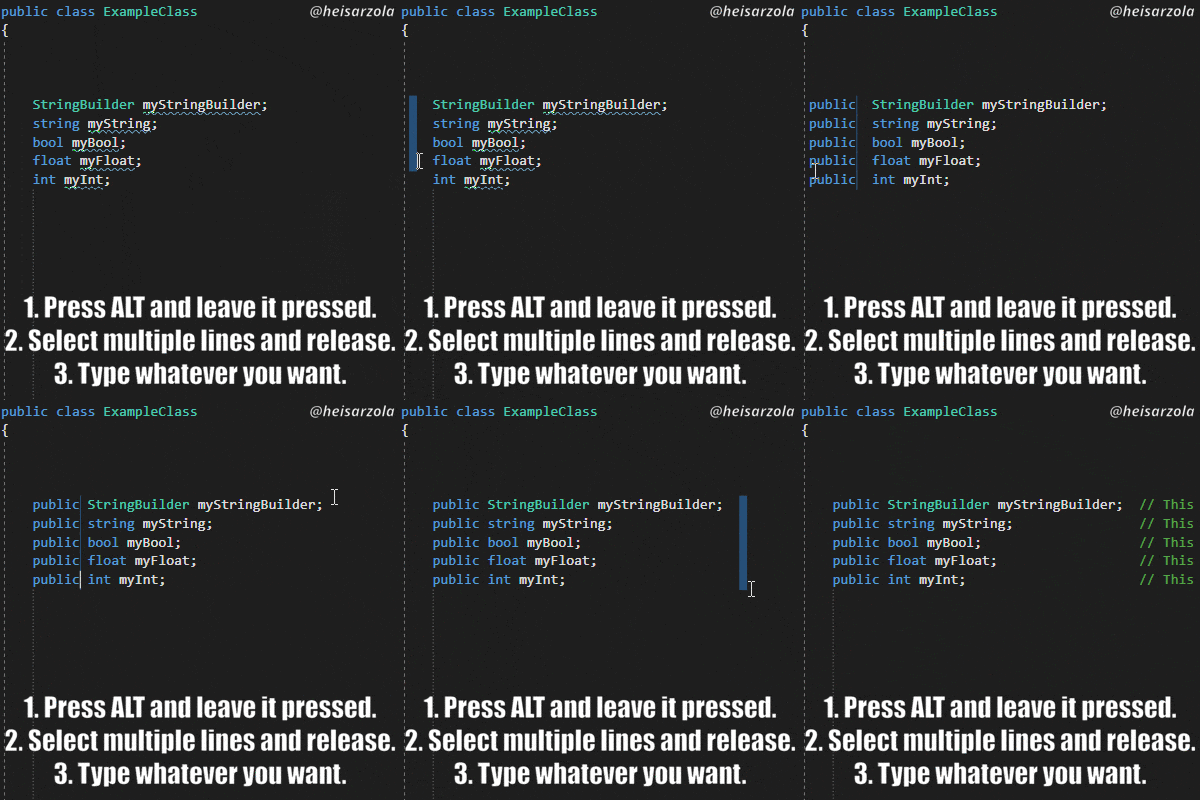
Pretty Straightforward
- Press the ALT button on your keyboard and leave it pressed.
- Select multiple lines and release.
- Type whatever you want on all lines at once.
Get More Useful Tips On The GitHub Wiki
What you just read about was ONE of several programmer tips that are available on the Programmer Tips Wiki.
So if you liked the one you just read, be sure to check it out (or star it) as it gets updated often! 😮
Visual Studio sure is neat huh? It is a shame we often miss out on cool obscured features like that.