


Unity Tool - Group Utility
Swiftly group together many GOs under a same parent with this little tool.
Swiftly Organize Your Code With A Simple Command
GameObjects in Unity’s hierarchy are both a charm and a curse. The distinction, relies heavily on how well you organize and break down the functionality of your game.
You can esentially use GameObjects as folders, in fact, I haven’t seen a project that doesn’t do this.
However, a minor complaint of mine was that in order to use them as a folder, I had to do the following EVERY TIME:
- Create an empty GameObject.
- Reset that new GameObject’s transform.
- Reset the items to be contained within the new “folder”‘s transform as well.
- Drag and drop them into the “folder”.
Sure, they aren’t THAT many steps or too complicated for that matter, but when you do this over and over, you are just bound to mess up on those transforms.
This is why this utility was created, just to save headaches down the line.
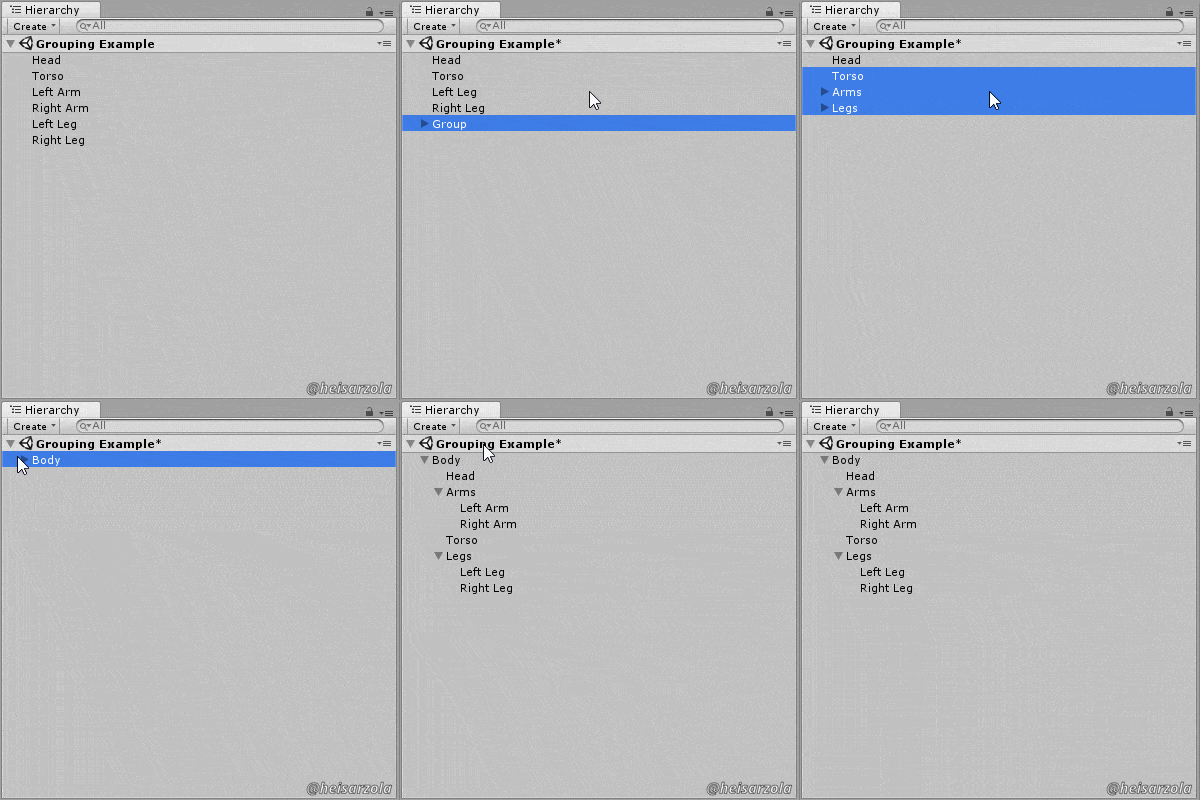
Download The Tool
Just leave the script inside a folder named “Editor” and then you can use:
CTRL+G
While selecting two or more items in the hierarchy to make use of the tool.
Simple and effective 😀
Visit The GitHub Repository For More FREE Tools
You just read about one of several FREE tools that you can get on the Unity Development Tools Repository. Again, they are FREE so just go see them, there are neat things in there~
The post is short again, but with a tool so straightforward and useful, you shouldn’t need more information.
So I hope it becomes useful to you and your games :3